


Manuskript
178 likes
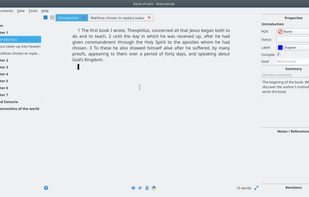
Open-source software offering a hierarchical outliner, distraction-free editor, character management, plot tools, Snowflake method support, section multi-organization, customizable writing workflows, cross-platform availability, and export to standard formats.

Cost / License
- Free
- Open Source (GPL-3.0)
Application typeApplication types
 EU
EUPlatforms
- Mac
- Windows
- Linux
- Snapcraft
- Flathub
- Flatpak


Features

Highlights All activities
Manuskript News & Activities
Recent News
No news, maybe you know any news worth sharing?
Share a News Tip
Recent activities
 DuskMateno added Manuskript as alternative to NEO Word Processor
- soul1472 liked Manuskript
- snoop93 liked Manuskript
 DavidBoissevain added Manuskript as alternative to Fyka Notes
 FocusCommitApp added Manuskript as alternative to QuillSpace
 Danilo Venom added Manuskript as alternative to Manutius
 ralist added Manuskript as alternative to Writer Studio
 Mira Ellison added Manuskript as alternative to Quilva
 JL Griffin added Manuskript as alternative to Draftline
 Inkbound-app added Manuskript as alternative to Inkbound-write


Open/Free soft must have
Must have


Writing
A vast compilation of great writing apps and word processors, for all your writing needs. From office suites to publishing tools. Now with an emphasis on privacy.


$0.00 and/or Open source Creative Software
Here's a list of free and/or open source creative software that I found
Official Links
Install from the command line
flatpak install flathub ch.theologeek.Manuskript
Developed by
 Theologeek
 Licensing
Open Source (GPL-3.0) and Free product.Written in
Rating
Average rating of 4.5Alternatives
172 alternatives listedBadge
Get an embeddable badge for ManuskriptSupported Languages

AlternativeTo Categories
News & Books, Office & Productivity, Business & CommerceGitHub repository
- 2,453 Stars
- 327 Forks
- 589 Open Issues
- Updated


Comments and Reviews
The only program that fits my workflow for larger (read: multi-chapter) works, and my secondary option for shorter works.
I've used version 0.6.0, for Linux (Mint 18.2) and Windows (7), and just updated to 0.8.0. Most of this was thus written with 0.6.0 in mind, with a few allowances for visible updates.
Pros:
Cons:
Other notes:
Great tool for fiction writing minuses: In fullscreen and compile mode text shows without spaces after commas not all compile filters working miss git integration files names stupid on cyrylic
Manuskript is an amazing software I wish I could use. I love its features and structure. Unfortunately, after a while, I can't open projects anymore. I connected the support but never got an answer.
Linux alternative to Scrivener
It looks like a great alternative to Scrivener, but unfortunately you can't use bold or any other code, the software has no ability to hide the code and display only the formatted text, it looks ridiculous.
This is by far the best alternative to Scrivener. It’s only a few features short of outright beating Scrivener. Potential to become the industry standard as soon as it’s stable and with a form of crash rescue or automatic cloud sync.
highly recommended.
This is a pro level creative tool, and it's almost mind-boggling how it's open source and free.